May 18, 2026
Apple Privacy and iPhone: How to actually stay private in 2026, and why still leads the pack
We all know the feeling. You Google one random thing and suddenly every app on your phone is showing you ads for it. Or you get that creepy “how did they know I was thinking…

We all know the feeling. You Google one random thing and suddenly every app on your phone is showing you ads for it. Or you get that creepy “how did they know I was thinking about that?” moment. Privacy is not some nerdy tech topic anymore. It is everyday peace of mind. Apple has been quietly building some of the strongest privacy tools on the planet, and they are already on your iPhone right now. No extra apps or complicated setups are required for the basics. Here is exactly what is protecting you, how to turn on the big ones, and one easy way to go even further with Proton.
Apple’s Privacy First Approach
Apple’s whole philosophy boils down to one simple rule. Collect as little of your data as possible and never sell it. Most processing happens right on your device instead of in the cloud, and they have been doing this long before it became trendy. It is not marketing fluff. I have seen the difference when I compare my iPhone to other devices. Fewer random trackers, fewer creepy data leaks, and way less “we know everything about you” vibes. It is the foundation everything else sits on.
But Let’s Be Honest. Apple Is Not Perfect
Let us address the elephant in the room. Apple is not perfect, and no big tech company is. They still collect certain diagnostic and usage data even if it is anonymized. They have to comply with court orders and government requests. They also operate a massive ecosystem with business interests that sometimes clash with pure privacy ideals. There have been fair criticisms over the years about things like App Tracking Transparency limitations and past proposals that raised eyebrows in the privacy community.
However, when you stack them up against the competition, Apple still comes out ahead by a wide margin. Google’s entire business is built on tracking and advertising. Meta tracks you relentlessly across the web and apps. Apple, on the other hand, makes its money primarily from selling devices and services, not from selling your data. This fundamental difference in business model allows them to offer much stronger privacy protections by default.
What Does Privacy Mean to Me?
Privacy hits different because I spend so much time capturing real moments with my phone. Whether it is golden hour shots in the Smokies, a quiet walk with the dog, or just everyday life here in Kentucky, those photos and messages are mine.
In a world where every click, scroll, and photo is turned into data that gets bought and sold, I want to know my stuff stays mine. I do not want some company quietly building a profile of where I go, what I shoot, or who I talk to just so they can sell me something later. Turning on these tools gives me back that simple freedom. It lets me create, share, and live without feeling like my digital life is for sale. When I post online (like on 𝕏), it’s my choice to share that image.
iCloud Private Relay. Hide Your Browsing from Everyone
If you have iCloud+ (the paid tier), turn on Private Relay and it is like putting on an invisibility cloak while you browse. It hides your real IP address and splits your web requests so neither Apple nor the website you are visiting can see the full picture. Safari traffic gets routed through two separate relays. One is run by Apple and one by a partner. No single company knows both who you are and where you are going. Head to Settings > [Your Name] > iCloud > Private Relay and flip the switch. It has been a game changer for me on public Wi Fi or when I am just doom scrolling.
Advanced Data Protection. End-to-End Encrypt Almost Everything
For the extra paranoid or anyone who just wants maximum safety, turn on Advanced Data Protection. This brings true end-to-end encryption to a ton more iCloud stuff: Photos, Notes, Voice Memos, Messages in iCloud, and even your backups. Apple cannot access your data even if they wanted to. Only you hold the keys. Go to Settings > [Your Name] > iCloud > Advanced Data Protection and enable it. You will need to set up a recovery method (a trusted device or contact), but once it is on you get that “no one but me” feeling most services only promise.
Important warning: If you forget your Apple ID password and lose access to your recovery method, Apple literally cannot help you recover your account or data. It is the trade off for true end-to-end encryption. You are the only one with the keys. So make sure you store that recovery info somewhere safe.
End-to-End Encryption in iMessage and FaceTime
This one has been rock solid for years and still blows my mind how seamless it is. Every iMessage, FaceTime call, and even iMessage reactions are end-to-end encrypted from your device straight to the other person’s. Apple never sees the content, cannot read it, and cannot hand it over to anyone else. You will see the little lock icon or “end-to-end encrypted” notice in the call info. It is automatic. No toggle is needed. But knowing it is there makes every text and video call feel a lot more private than regular SMS or most other messaging apps.
Apple Intelligence vs Gemini. Power Versus Privacy
When it comes to AI features on your phone there is a clear tradeoff between power and privacy. Google’s Gemini is currently in a league of its own. It is far more advanced and capable at complex tasks, creative writing, image generation, and deep reasoning.
The catch is that this power comes at a real privacy cost. Most of what you ask Gemini gets sent to Google’s cloud servers for processing. That means your prompts, conversations, and personal information are being collected and used to train its models.
Apple Intelligence is noticeably weaker and more limited right now. But it was built with privacy as a core principle. Most features run directly on your device so your data never leaves your iPhone. When it does need extra power it uses Apple’s Private Cloud Compute, a system designed so Apple cannot access or store your actual information.
For many everyday tasks like summarizing notes, cleaning up photos, or helping with writing, Apple Intelligence still delivers useful results while keeping your data far more private. However, if the most powerful AI is your top priority, the privacy trade-off with Gemini may be one you’re willing to make.
Level Up with Proton Mail and Tracker Blocking
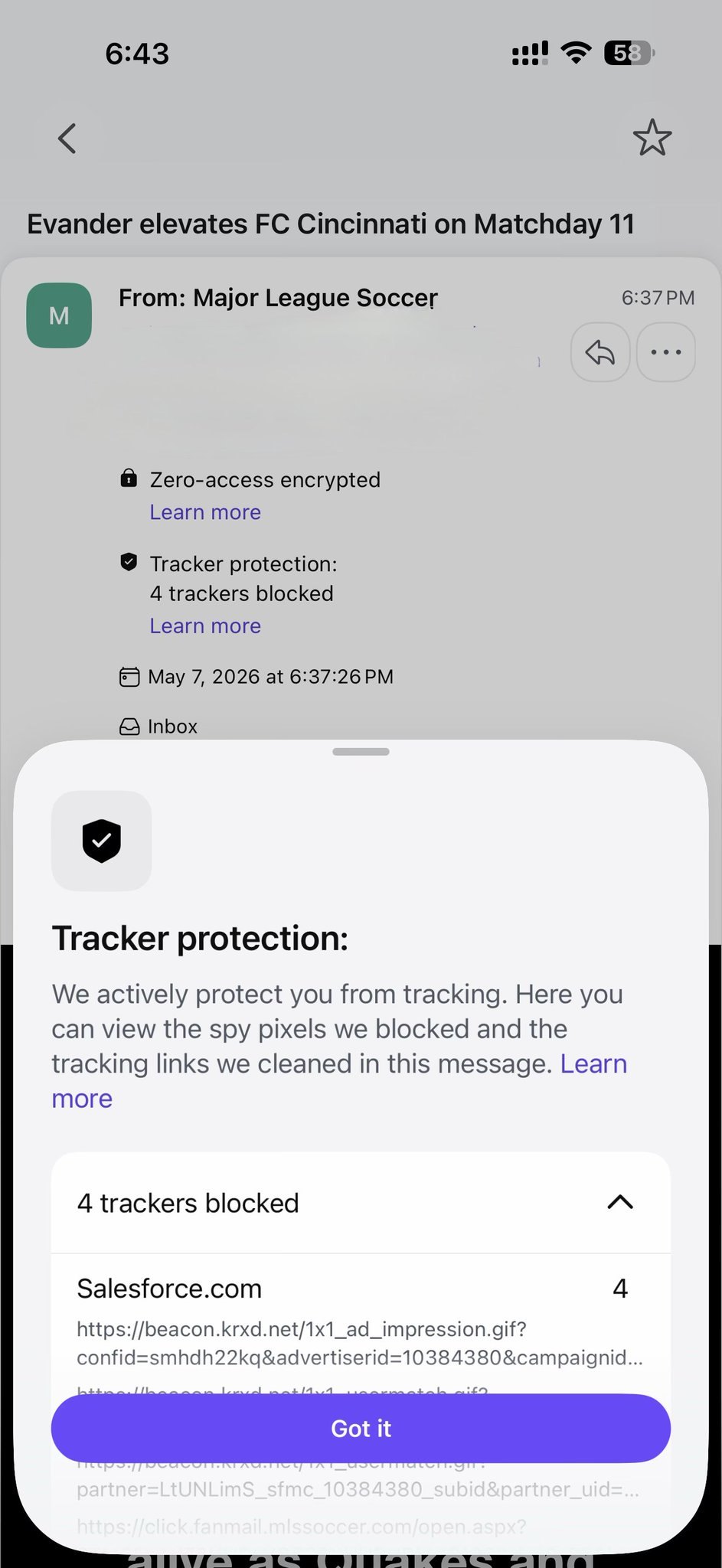
Apple is excellent, but sometimes you want to go full privacy nerd. That is where Proton comes in. Proton Mail is completely end-to-end encrypted email with zero access (even Proton cannot read your inbox). No scanning for ads, no selling your data, and it is based in Switzerland with some of the strictest privacy laws on earth. The built in tracker blocker automatically strips those sneaky tracking pixels from emails so senders do not know when or if you opened it. Pair it with Proton VPN and you get ad plus tracker plus malware blocking at the network level. Free tier is solid for basics. The paid plans unlock unlimited everything. I switched my main email years ago and never looked back. It feels like the final layer on top of Apple’s already strong foundation.
Health Data Privacy. Apple Health vs Fitbit and Google
Your health information is some of the most sensitive and personal data on your phone. Apple Health treats it with strong privacy protections by default. Most of your health metrics, sleep patterns, heart rate, workout history, and other records stay stored and processed directly on your iPhone. Apple does not sell your health data and gives you detailed control over who can access what.
Fitbit (now owned by Google) and Google Health services work differently. They send far more of your data to Google’s cloud servers. Because Google’s business model is built on data collection and advertising, your health information can become part of a much larger profile they create about you.
If protecting your personal health data matters to you, Apple Health currently provides significantly stronger privacy than Fitbit or Google Health.
Android users have solid privacy options too.
If you’re using an Android phone, you still have options! It’s harder (as Android is owned and developed by Google), but it can absolutely be done!
Proton services work great on any Android phone, giving you the same end-to-end encrypted email, tracker blocker, and VPN protection that help keep your data safe. If you have a Google Pixel, you can go even further with GrapheneOS. This privacy-focused operating system removes Google’s tracking and adds strong security features while still feeling like a normal smartphone.
Apple’s ecosystem isn't a flawless privacy utopia, but its incentives are fundamentally aligned with protecting your data rather than exploiting it. In a digital world where you have to choose who handles your information, Apple remains significantly ahead of its Big Tech rivals, offering a sturdy foundation that you can fortify further with tools like Advanced Data Protection and Proton Mail.
"Privacy means people know what they're signing up for, in plain English and repeatedly." - Steve Jobs
Rich Photography · Lexington, Kentucky